
Best CRM Software for Small Businesses in 2026 (Simple & Powerful Tools Compared)
Introduction
Choosing the best CRM software for small businesses 2026 isn’t simply about finding somewhere to store customer names and contact details.
A good CRM can help you organise leads, track sales opportunities, manage customer conversations, automate repetitive follow-ups, and give your team a clearer view of where every prospect sits within the customer journey.
But small businesses don’t all need the same type of CRM.
A freelancer managing a relatively small number of clients may prioritise simplicity and affordability. A growing sales team may need stronger pipeline management and reporting. An agency may want CRM functionality connected with marketing automation, funnels, communication tools, and multiple client accounts.
That’s why choosing the right platform depends less on finding the CRM with the longest feature list and more on finding the one that fits how your business actually works.
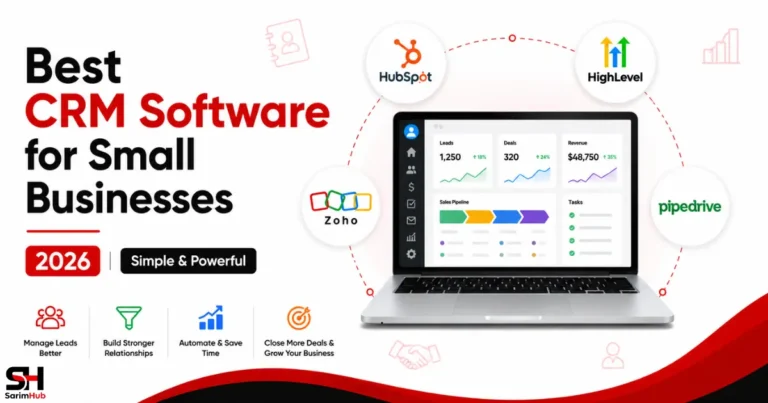
In this guide, we’ll compare four different approaches to CRM software:
- HubSpot CRM — a broad CRM ecosystem with accessible tools for businesses starting and growing their customer-management processes
- Zoho CRM — a flexible and customisable CRM with a strong focus on value
- Pipedrive — a sales-focused CRM built around visual pipeline management
- HighLevel — an all-in-one CRM, marketing automation, and lead-management platform particularly relevant to agencies and marketing-focused businesses
We’ll compare their strengths, limitations, ease of use, pricing considerations, automation capabilities, and ideal users to help you decide which approach makes the most sense for your business.
👉 Related Read: Best CRM Software for Agencies in 2026 (Top Platforms Compared)
What is CRM Software? (Simple Explanation)
CRM stands for Customer Relationship Management.
CRM software provides a central system for managing the information, interactions, and processes connected with your leads, prospects, and customers.
Instead of keeping customer details across spreadsheets, email inboxes, notes, calendars, and separate sales tools, a CRM brings that information together so you can understand who each customer is, what has happened so far, and what needs to happen next.
Contact & Customer Management
At its most basic level, CRM software stores customer and prospect information such as contact details, company information, previous conversations, activities, notes, and other relevant records.
This creates a central customer history that can be accessed whenever someone needs to understand the relationship.
Lead & Sales Pipeline Management
CRM platforms can help businesses track potential customers as they move through different stages of the sales process.
A simple pipeline might look like this:
New Lead
↓
Contacted
↓
Qualified
↓
Proposal Sent
↓
Deal Won or Lost
This gives businesses a clearer view of active opportunities and helps prevent promising leads from disappearing simply because somebody forgot to follow up.
Communication Tracking
Many CRM platforms can connect customer records with email, calls, meetings, messages, and other communication channels.
Instead of conversations being scattered across individual inboxes or devices, relevant activity can remain associated with the customer record.
Tasks & Follow-Ups
CRM software can also help teams manage activities such as calls, meetings, reminders, appointments, and follow-up tasks.
More advanced systems can automate parts of this process based on customer actions, pipeline stages, or predefined workflows.
Automation & Integrations
Modern CRM platforms increasingly extend beyond basic contact and pipeline management.
Depending on the platform, you may find marketing automation, email campaigns, AI functionality, reporting, appointment scheduling, lead capture, customer service tools, integrations, and even website or funnel-building capabilities.
However, not every small business needs all of these features.
The purpose of CRM software isn’t to collect as many tools as possible. It’s to create a more organised and consistent way to manage customer relationships from the first interaction through the ongoing relationship.
Why Small Businesses Need CRM Software in 2026
A small business doesn’t necessarily need CRM software from its first day of operation.
But as the number of leads, customers, conversations, tasks, and sales opportunities increases, managing everything through memory, spreadsheets, inboxes, and disconnected tools becomes increasingly difficult.
CRM software can provide the structure needed to manage that growth without allowing important customer information or opportunities to disappear between systems.
Customer Information Becomes Harder to Manage
When a business only has a handful of customers, remembering conversations and keeping basic notes may be manageable.
As the customer base grows, that approach becomes unreliable.
A CRM creates a central record of contacts, previous interactions, opportunities, tasks, and other relevant information so the business isn’t dependent on someone’s memory or scattered records.
Leads Need Consistent Follow-Up
Generating a lead doesn’t automatically create a customer.
Prospects may need additional information, reminders, calls, emails, appointments, or multiple conversations before making a decision.
CRM software helps businesses track those opportunities and identify which leads require attention instead of relying on manual reminders.
Sales Pipelines Provide Better Visibility
Without a structured pipeline, it can be difficult to understand how many potential deals are active and what stage each opportunity has reached.
A CRM can make that process visible.
Businesses can see which prospects are new, which are being actively pursued, which have received proposals, and which opportunities have been won or lost.
That visibility can help teams prioritise their time and identify where potential customers are getting stuck.
Automation Can Reduce Repetitive Work
Many modern CRM platforms can automate routine activities such as assigning leads, creating tasks, sending follow-up messages, updating records, triggering reminders, or moving contacts between stages.
The goal isn’t to automate every customer interaction.
It’s to remove repetitive administrative work where automation makes sense so people can spend more time on conversations and decisions that actually require human involvement.
👉 Related Read: Best Marketing Automation Tools for Small Businesses in 2026 (Top Platforms Compared)
Customer Communication Can Become More Consistent
When customer communication happens across multiple employees, inboxes, phone calls, and channels, maintaining context can become difficult.
Connecting relevant communication with CRM records can give teams a clearer understanding of previous interactions and reduce the likelihood of customers repeatedly having to explain the same situation.
Growing Teams Need Shared Information
CRM software becomes increasingly valuable when more than one person is involved in sales or customer management.
Instead of customer knowledge belonging to one individual, authorised team members can work from shared records, tasks, pipelines, and activity histories.
This can make collaboration more consistent and reduce dependency on individual employees holding important information.
CRM Can Connect Different Parts of the Customer Journey
Depending on the platform, CRM functionality can connect with marketing automation, email, lead-generation forms, appointment scheduling, sales pipelines, customer service, and other business systems.
That can create a more connected journey:
Lead Captured
↓
Contact Added to CRM
↓
Follow-Up Begins
↓
Opportunity Enters Sales Pipeline
↓
Customer Converts
↓
Relationship Continues
The value of CRM software therefore isn’t simply having a database of contacts.
It’s having a structured system for understanding and managing customer relationships as the business grows.
What to Look for in CRM Software for a Small Business
The best CRM for your business isn’t necessarily the platform with the most features.
A better approach is to identify the capabilities you genuinely need today, while also considering whether the CRM can continue supporting you as your customer base, sales process, and team grow.
Here are the main areas worth evaluating.
Ease of Use
A CRM only provides value if people actually use it.
For smaller businesses without dedicated CRM administrators, an intuitive interface, straightforward setup, and manageable learning curve can matter more than having hundreds of advanced features.
Consider how easily you can add contacts, update deals, create tasks, find customer information, and understand what’s happening within your sales pipeline.
Contact & Lead Management
Strong contact management is the foundation of a useful CRM.
You should be able to organise leads and customers, record important information, view previous activity, add notes, assign ownership, and understand where each relationship currently stands.
If your business generates leads from several sources, also consider how easily those leads can enter the CRM without constant manual data entry.
Sales Pipeline Management
If selling is an important part of your business, look at how the CRM handles opportunities and deal stages.
A useful pipeline should make it easy to see:
- Which opportunities are currently active
- Where each deal sits within the sales process
- Which prospects require follow-up
- Which deals are progressing or becoming inactive
- What has been won or lost
The right level of pipeline sophistication will depend on how complicated your sales process actually is.
Automation
Automation can become increasingly valuable as repetitive tasks begin consuming more time.
Depending on the CRM, you may be able to automate follow-ups, lead assignments, task creation, pipeline changes, email sequences, notifications, and other routine processes.
The important question isn’t simply “Does this CRM have automation?”
It’s whether the automation available matches the workflows your business genuinely needs.
Integrations
Your CRM probably won’t operate alone.
Consider whether it connects effectively with the tools you already use for email marketing, websites, forms, calendars, accounting, customer support, communication, ecommerce, or other business processes.
Good integrations can reduce duplicated work and help information move between systems more consistently.
Reporting & Visibility
CRM reporting can help you understand what’s happening across leads, deals, sales activity, and customer relationships.
A very small business may only need basic pipeline visibility, while a growing sales team may require dashboards, forecasting, performance reports, conversion data, and more detailed analytics.
Don’t pay for sophisticated reporting simply because it exists. Choose the level of visibility that supports the decisions you actually need to make.
Scalability
A CRM that works perfectly for 50 contacts may not necessarily remain suitable when your business has thousands of contacts, several employees, multiple pipelines, or more complicated automation.
Consider not only what you need today, but what you’re reasonably likely to need as the business develops.
That doesn’t mean buying an enterprise-level system before you need one. It means avoiding a platform you’re likely to outgrow unnecessarily quickly.
Pricing & Total Cost
CRM pricing can become more complicated than the headline monthly price.
Depending on the platform, costs may change based on users, contacts, features, automation limits, communication usage, additional hubs or products, and higher subscription tiers.
We’ll examine pricing later in this guide, but when comparing CRMs, always consider the likely cost for your actual use case, rather than comparing only the cheapest advertised plans.
The Wider Platform
Finally, consider whether you want CRM software to remain primarily a CRM or become part of a broader business system.
This is particularly relevant to the four platforms we’re comparing.
Pipedrive places strong emphasis on sales pipeline management.
Zoho CRM sits within a much larger ecosystem of business applications.
HubSpot can extend across marketing, sales, service, content, and other customer-facing functions.
HighLevel combines CRM with marketing automation, funnels, communication, lead generation, and agency-oriented functionality.
Neither approach is automatically better.
The right CRM is the one whose broader direction matches the way you want your business technology stack to develop.
Best CRM Software for Small Businesses 2026 (Top Picks Compared)
There is no single CRM that will be the best choice for every small business.
The four platforms below take noticeably different approaches to customer relationship management. Some prioritise accessibility and a broader customer platform, others focus heavily on sales pipelines, customisation, or combining CRM with marketing automation.
Here is how each option fits.
1- HubSpot CRM — Best for an Accessible All-in-One CRM Ecosystem
HubSpot is one of the most recognisable CRM platforms and can be particularly attractive to small businesses that want to start with core CRM functionality while retaining the option to expand into a much broader customer platform.
Its CRM sits within HubSpot’s wider ecosystem covering areas such as sales, marketing, customer service, content, and commerce.
That means a small business can begin with relatively straightforward contact and pipeline management without necessarily adopting the entire ecosystem immediately.
Why HubSpot Stands Out
One of HubSpot’s biggest advantages is its ability to accommodate different stages of business growth.
For a smaller operation, the CRM can provide a structured place to manage contacts, companies, deals, tasks, and customer activity. As requirements become more sophisticated, businesses can explore additional functionality across HubSpot’s wider platform.
This makes HubSpot particularly interesting for businesses that want a CRM they can build around rather than simply a standalone contact database.
CRM & Sales Management
HubSpot provides tools for organising contacts, companies, deals, activities, and sales pipelines.
Businesses can track interactions and opportunities within customer records, helping create a clearer history of the relationship and giving sales activity more structure.
Its deal pipelines can also help users understand which opportunities are active and what needs attention next.
Marketing, Service & Wider Ecosystem
HubSpot extends well beyond conventional CRM functionality.
Its broader platform includes marketing, sales, customer service, content, operations, and other customer-facing capabilities, although the exact features available depend on the products and subscription levels being used.
For businesses considering HubSpot, this wider ecosystem can be both a strength and an important purchasing consideration.
You don’t necessarily need everything HubSpot offers.
The question is whether having the ability to expand into that ecosystem aligns with where your business is heading.
Where HubSpot May Not Be the Best Fit
Businesses requiring increasingly sophisticated functionality should pay close attention to how their required features map to HubSpot’s paid products and tiers.
A business attracted primarily by accessible entry-level CRM functionality may eventually have very different requirements — and costs — once it needs more advanced marketing, sales, service, automation, or reporting capabilities.
So HubSpot should be evaluated based on the version of the platform you are realistically likely to need, not simply the easiest point of entry.
Who Is HubSpot Best For?
HubSpot is particularly worth considering for:
- Small businesses introducing structured CRM processes
- Growing teams that want CRM, sales, and customer-facing tools within a connected ecosystem
- Businesses that may expand into marketing, service, or additional HubSpot functionality
- Teams that value having customer information and activity connected across different business functions
👉 Related Read: HubSpot Review 2026: Features, Pricing, Pros & Cons (Is It Worth It?)
 Explore Visual
→
Explore Visual
→
HubSpot Visual Review 2026
Explore HubSpot through a visual guide designed for faster understanding and decision-making.
Get Started with HubSpot
HubSpot gives small businesses a way to begin organising customer relationships, leads, and sales activity while leaving room to expand into a broader CRM ecosystem.
Explore HubSpot’s available CRM tools and plans to see whether its approach fits the way you want to manage and grow your customer relationships.
Affiliate Disclosure: SarimHub is a HubSpot affiliate and earns a commission if you purchase through our link, at no extra cost to you.
2- Zoho CRM — Best for Customisation & Value
Zoho CRM takes a different approach.
Rather than positioning CRM primarily around simplicity or sales pipeline visualisation, Zoho combines extensive CRM functionality with considerable customisation and access to a much larger ecosystem of business applications.
That can make it particularly attractive to small and growing businesses that want flexibility without immediately moving toward enterprise-level CRM software.
Why Zoho CRM Stands Out
Zoho CRM gives businesses considerable control over how customer information, sales processes, workflows, and reporting are organised.
Businesses can adapt elements of the system to suit their processes rather than necessarily restructuring those processes around a rigid CRM setup.
This flexibility becomes particularly valuable when a company’s sales workflow develops beyond a very basic pipeline.
Automation & Customisation
Zoho CRM supports workflow automation and allows businesses to configure different parts of their CRM environment around their operational requirements.
The depth available can be valuable for growing teams, but greater customisation can also mean spending more time configuring the platform effectively.
Businesses wanting the simplest possible CRM experience may therefore prefer a more streamlined approach.
The Wider Zoho Ecosystem
Zoho CRM also benefits from being part of Zoho’s much broader suite of business software.
Businesses using or considering other Zoho applications may find additional value in keeping different operational functions within the same ecosystem.
However, you shouldn’t choose Zoho CRM simply because the ecosystem is large. The CRM itself still needs to fit your customer-management and sales processes.
Where Zoho CRM May Not Be the Best Fit
The same flexibility that makes Zoho powerful can introduce additional complexity.
Businesses wanting a CRM that requires minimal configuration may find some of that depth unnecessary, particularly when their sales process is relatively straightforward.
Who Is Zoho CRM Best For?
Zoho CRM is particularly worth considering for:
- Small businesses looking for strong CRM value
- Growing teams requiring more customisation
- Businesses with evolving or less conventional sales processes
- Companies already using or interested in the wider Zoho ecosystem
3- Pipedrive — Best for Visual Sales Pipeline Management
Pipedrive focuses strongly on one of the most important jobs of a sales CRM: helping teams understand and progress their deals.
Its sales-oriented approach makes it particularly relevant to businesses where managing opportunities through a clearly defined pipeline is more important than building an extensive all-in-one marketing ecosystem.
Why Pipedrive Stands Out
Pipedrive’s central strength is its emphasis on visual pipeline management.
Instead of turning CRM into an unnecessarily complicated collection of unrelated business tools, Pipedrive keeps sales activity and deal progression at the centre of the experience.
For sales-driven businesses, that focus can be a significant advantage.
Pipeline & Deal Management
Businesses can organise opportunities into stages that represent their sales process and move deals through the pipeline as they progress.
This makes it easier to see where opportunities currently stand, which deals require attention, and what activities should happen next.
For teams managing multiple active prospects, that visibility can make everyday sales management considerably easier.
Sales Activity & Follow-Up
A CRM isn’t useful if deals simply sit inside it.
Pipedrive’s sales-focused structure encourages businesses to connect opportunities with activities and follow-up actions, helping teams maintain momentum rather than treating the CRM as a passive database.
Where Pipedrive May Not Be the Best Fit
Pipedrive’s sales focus also defines its boundaries.
Businesses primarily looking for a broad marketing automation, funnel-building, customer-service, or all-in-one business platform may find that another CRM ecosystem better matches their requirements.
That doesn’t make Pipedrive less capable at what it does. It simply reflects its stronger emphasis on the sales process itself.
Who Is Pipedrive Best For?
Pipedrive is particularly worth considering for:
- Sales-focused small businesses
- Teams managing multiple active deals
- Businesses that value visual pipeline management
- Consultants and service businesses with structured sales processes
- Users who want CRM centred primarily around selling
4- HighLevel — Best for Agencies & Marketing Automation
HighLevel approaches CRM from a very different direction.
It combines CRM and pipeline management with marketing automation, funnels, websites, email, SMS, appointment scheduling, communication tools, and other functionality within a broader platform.
That makes it particularly relevant to agencies and marketing-focused businesses trying to consolidate several operational tools.
Why HighLevel Stands Out
HighLevel’s main advantage isn’t simply that it contains CRM functionality.
Its strength is the way CRM can operate alongside lead capture, marketing automation, communication, funnels, scheduling, and other parts of the customer journey.
For businesses that genuinely need those capabilities together, this can reduce the number of separate platforms required to manage marketing and customer acquisition.
CRM & Pipeline Management
HighLevel allows businesses to organise contacts, manage opportunities, build pipelines, and track leads as they progress through different stages.
Because those CRM functions sit inside the wider HighLevel ecosystem, customer records can interact with automation, communication, forms, funnels, calendars, and other platform features.
Marketing Automation & Communication
Automation is one of the major reasons businesses consider HighLevel.
Workflows can connect customer actions with follow-ups and other processes, while email, SMS, and additional communication functionality can support ongoing lead management.
👉 Related Read: GoHighLevel Review 2026: Can It Replace ClickFunnels, HubSpot & ActiveCampaign?
Agency Functionality
HighLevel is particularly notable for its agency-oriented capabilities.
Businesses managing multiple clients can use sub-accounts and other agency features to separate client environments while operating within the broader HighLevel platform.
That makes its ideal audience somewhat different from a conventional small business simply looking for basic CRM software.
Where HighLevel May Not Be the Best Fit
HighLevel’s breadth can become unnecessary complexity when a business only needs straightforward contact management or a simple sales pipeline.
There is little benefit in adopting an extensive marketing and automation ecosystem if most of its capabilities won’t become part of your actual workflow.
This is why HighLevel shouldn’t automatically be viewed as “better” simply because it contains more functionality.
Who Is HighLevel Best For?
HighLevel is particularly worth considering for:
- Digital marketing agencies
- Businesses combining CRM with lead generation and marketing automation
- Teams wanting funnels, communication, scheduling, and CRM within one platform
- Agencies managing multiple client accounts
- Businesses actively trying to consolidate several marketing tools
Get Started with HighLevel
HighLevel combines CRM, marketing automation, funnels, communication, and lead-management tools within one platform.
If those capabilities match the way your business operates, you can explore HighLevel through its available trial and see whether the broader system fits your workflow.
CRM Software Comparison (Quick Overview)
| Feature | HubSpot CRM | Zoho CRM | Pipedrive | HighLevel |
|---|---|---|---|---|
| Best For | Connected CRM ecosystem | Customisation & value | Visual sales pipelines | Agencies & marketing automation |
| CRM Focus | Broad customer platform | Flexible & customisable | Sales-focused | CRM + marketing system |
| Contact Management | ✅ Strong | ✅ Strong | ✅ Strong | ✅ Strong |
| Sales Pipelines | ✅ Included | ✅ Included | ✅ Core strength | ✅ Included |
| Marketing Automation | ✅ Available | ✅ Available | ⚠️ More limited focus | ✅ Core strength |
| Sales Automation | ✅ Available | ✅ Strong | ✅ Strong | ✅ Strong |
| Wider Ecosystem | ✅ Extensive | ✅ Extensive | ⚠️ Sales-focused ecosystem | ✅ Extensive marketing ecosystem |
| Agency Focus | ⚠️ Possible, not primary | ⚠️ Possible, not primary | ❌ Not primary | ✅ Strong |
| Learning Curve | Easy–Moderate | Moderate | Easy–Moderate | Moderate–Advanced |
| Best Fit | Businesses wanting room to expand | Businesses wanting flexibility | Sales-driven businesses | Agencies & marketing-focused businesses |
How to Choose the Best CRM Software for Small Businesses 2026
The best CRM isn’t necessarily the platform with the longest feature list. It’s the one that fits how your business actually manages leads, customers, sales, and communication.
Before choosing a CRM, consider the following areas.
Start with Your Main Goal
Ask what you primarily need the CRM to accomplish.
If you mainly want an accessible way to organise contacts, track customer relationships, and build into a broader business platform, HubSpot is a strong place to start.
If flexibility, customisation, and access to a wider suite of business applications matter more, Zoho CRM may be the better fit.
If your priority is managing a visual sales pipeline and helping a sales team move opportunities toward closing, Pipedrive deserves particular consideration.
If you want CRM functionality alongside funnels, marketing automation, lead management, communication tools, and agency-oriented capabilities, HighLevel offers the broadest all-in-one approach of these four.
Consider How Much Complexity You Actually Need
More functionality isn’t automatically better.
A small business that primarily needs contact management and a straightforward sales pipeline may gain little from adopting a much larger marketing ecosystem.
On the other hand, a business already using several separate tools for CRM, funnels, automation, email, scheduling, and customer communication may benefit considerably from consolidation.
The goal should be to solve genuine workflow problems rather than accumulate software features.
Think About Your Sales Process
Different CRMs place different levels of emphasis on sales.
Pipedrive is particularly suited to businesses where pipeline visibility and deal progression are central to everyday work.
HubSpot combines CRM and sales functionality with a much wider marketing, service, content, and customer platform.
Zoho CRM provides considerable flexibility for businesses that want to customise their CRM around their processes.
HighLevel extends beyond conventional CRM into lead generation, funnels, marketing automation, communication, and agency workflows.
Check the Wider Software Ecosystem
Your CRM rarely operates alone.
Consider whether it needs to connect with your email marketing platform, website, forms, calendar, customer support tools, accounting software, automation systems, or other applications.
A CRM that fits naturally into your existing technology stack can be more useful than a technically more powerful platform that introduces unnecessary complexity.
Consider Where Your Business Is Going
Don’t choose solely for the business you have today.
Think about whether you expect to add team members, manage more leads, introduce automation, build more sophisticated sales processes, or expand into additional marketing channels.
At the same time, avoid paying today for advanced functionality that you may never need.
🏆 The best CRM gives you enough room to grow without making your current business unnecessarily complicated.
Common Mistakes Beginners Make with CRM Tools
CRM software can make customer management much easier, but choosing the right platform is only part of the equation. How you implement and use it matters just as much.
Here are some common mistakes to avoid.
Choosing a CRM That Is More Complex Than You Need
It can be tempting to choose the platform with the most features, integrations, and automation capabilities.
But additional functionality often brings additional setup, learning, and cost.
Start with the problems your business actually needs to solve. A simpler CRM that your team uses consistently can provide more value than an advanced platform that becomes difficult to manage.
Failing to Define Your Sales Process First
A CRM shouldn’t determine how your business sells.
Before configuring pipelines, stages, automations, and follow-ups, understand how a potential customer actually moves from initial contact to becoming a customer.
Your CRM should support that process rather than force an unnecessarily complicated workflow around it.
Automating Too Much Too Early
Automation can save considerable time, but automating a poorly designed process simply makes the wrong process run faster.
Start with the essential workflows, make sure they work properly, and introduce additional automation where it removes genuine repetitive work.
Ignoring Data Quality
A CRM is only as useful as the information stored inside it.
Duplicate contacts, incomplete records, inconsistent fields, and outdated information can make reporting and automation less reliable.
Establish a simple, consistent approach to entering and maintaining customer information from the beginning.
Switching CRM Platforms Too Frequently
Changing platforms every time another CRM introduces an attractive feature can create more work than value.
Migration can involve moving contacts, rebuilding pipelines, recreating automations, reconnecting integrations, and retraining users.
Switch when your current CRM genuinely no longer meets your requirements — not simply because another platform has a longer feature list.
Paying for Features You Don’t Use
Higher-tier plans can include sophisticated automation, reporting, AI capabilities, additional users, and other advanced functionality.
Those features can be valuable when your business needs them.
But paying for unused capabilities doesn’t make your CRM better. Choose the level that supports your current requirements while leaving reasonable room for growth.
🏆 A good CRM should make customer management simpler and more consistent — not become another system your business has to struggle to manage.
Final Thoughts
The best CRM software for small businesses in 2026 isn’t determined by which platform offers the most features. It comes down to which CRM fits your customers, sales process, team, existing tools, and plans for growth.
HubSpot CRM is a strong option for businesses that want an accessible CRM with a much broader customer-platform ecosystem behind it. Zoho CRM offers considerable flexibility and customisation, while Pipedrive keeps sales pipelines and deal management firmly at the centre.
HighLevel takes a different approach by combining CRM functionality with marketing automation, funnels, communication, lead management, and agency-oriented tools within a broader platform.
Each can be the right choice for a different type of business.
Rather than asking “Which CRM has the most features?”, ask:
“Which CRM solves the problems my business actually has without introducing unnecessary complexity?”
That question will usually lead you toward a much better decision.
🏆 Choose for fit first, functionality second, and leave enough room for your CRM to grow alongside your business.
Continue Your Journey with SarimHub
Choosing the right CRM is only one part of building a connected sales and marketing system. These SarimHub guides can help you explore the tools that work alongside CRM software and decide which combination makes sense for your business.
Looking to build a complete online brand instead of just choosing one tool?
👉 Get the free “Hand in Hand – Let’s Build Your Brand” (HHLBYB) workbook and follow a practical step-by-step journey from building your foundation to launching and growing your brand.
👉 Explore our Tools & Resources page to discover recommended AI tools, SaaS platforms, and business software that can help you grow more efficiently.
Best CRM Software for Small Businesses 2026 (Final Recommendation)
There is no single CRM that will be the best choice for every small business. The right option depends on how you manage customers, how your sales process works, and how much additional marketing or automation functionality you need.
Choose HubSpot CRM If…
You want an accessible CRM with contact management, sales tools, and the ability to expand into a much broader marketing, sales, service, and customer platform over time.
🏆 Best for: Businesses wanting a connected CRM ecosystem with considerable room to expand.
Choose Zoho CRM If…
You value flexibility, customisation, and the ability to connect your CRM with a wider ecosystem of business applications.
🏆 Best for: Small and growing businesses that want strong functionality and greater control over how their CRM is configured.
Choose Pipedrive If…
Your business revolves around managing opportunities, progressing deals through a clear pipeline, and giving sales teams an easy way to see what needs attention next.
🏆 Best for: Sales-focused businesses that prioritise pipeline management and deal progression.
Choose HighLevel If…
You want CRM functionality alongside marketing automation, funnels, lead management, customer communication, scheduling, and agency-oriented capabilities within a broader system.
🏆 Best for: Agencies and marketing-focused businesses looking to consolidate multiple functions into one platform.
The Bottom Line
HubSpot offers the broadest connected customer-platform path, Zoho CRM emphasises flexibility and customisation, Pipedrive keeps sales pipeline management at the centre, and HighLevel combines CRM with a much wider marketing and agency ecosystem.
The winner isn’t the CRM with the most features.
🏆 It’s the CRM whose strengths most closely match the way your business actually acquires, manages, and serves customers.
● Frequently Asked Questions (FAQs)
What is the best CRM software for small businesses in 2026?
There is no single best CRM for every small business. HubSpot, Zoho CRM, Pipedrive, and HighLevel serve different needs. The best choice depends on your sales process, required features, budget, existing software, and how much automation or marketing functionality you need.
What does CRM software do for a small business?
CRM software helps businesses organise customer information, manage leads, track sales opportunities, record interactions, schedule follow-ups, and maintain more consistent customer relationships. Many modern CRM platforms also include automation, reporting, marketing, and communication tools.
Does a small business really need CRM software?
Not every very small business needs a CRM immediately. However, once managing leads, conversations, follow-ups, and customer information through spreadsheets, inboxes, or memory becomes difficult, a CRM can provide a more organised system.
What is the easiest CRM for beginners?
HubSpot and Pipedrive are generally approachable options, although they emphasise different workflows. HubSpot provides an accessible entry into a broader customer platform, while Pipedrive focuses heavily on visual sales pipeline management.
Is there a free CRM for small businesses?
Yes. Some CRM platforms, including HubSpot and Zoho CRM, offer free options with limitations. Free plans can be useful for getting started, but businesses should check current feature, user, contact, and usage limits before choosing one.
Is HubSpot a good CRM for small businesses?
Yes, HubSpot can be a strong choice for small businesses that want CRM functionality with the option to expand into additional marketing, sales, service, content, and customer-management tools as their requirements grow.
Is Zoho CRM good for small businesses?
Zoho CRM can be particularly useful for small businesses that value flexibility, customisation, automation, and integration with a broader collection of business applications.
Is Pipedrive suitable for small businesses?
Yes. Pipedrive is particularly suited to sales-focused small businesses that want a visual way to manage deals, monitor pipelines, and keep sales activity organised without making broader marketing functionality the centre of the platform.
Is HighLevel suitable for small businesses?
HighLevel can suit small businesses that need more than traditional CRM functionality, particularly those wanting marketing automation, funnels, lead management, communication, and related tools in one ecosystem. Its broader functionality may be unnecessary for businesses with simpler CRM requirements.
What is the difference between CRM and marketing automation software?
CRM software primarily manages customer relationships, contacts, leads, deals, and sales activity. Marketing automation software focuses more heavily on automating campaigns, nurturing leads, messaging, segmentation, and other marketing processes. Many modern platforms combine elements of both.
Can CRM software automate follow-ups?
Yes. Many CRM platforms can automate tasks such as follow-up emails, reminders, lead assignments, deal-stage actions, and other repetitive processes. The exact automation capabilities depend on the platform and plan.
How much should a small business spend on CRM software?
There is no universal amount. Cost can depend on the number of users, contacts, required features, automation capabilities, integrations, and additional products. Businesses should compare the total cost of the functionality they actually need rather than simply comparing entry-level prices.
What should I look for when choosing CRM software?
Look at your sales process, ease of use, contact management, pipeline functionality, automation, integrations, reporting, team requirements, scalability, and total cost. The best CRM should solve genuine workflow problems without adding unnecessary complexity.
Can I switch CRM software later?
Yes, but switching can require migrating customer data, rebuilding pipelines and automations, reconnecting integrations, and training users on the new system. It is usually better to switch because your requirements have genuinely changed rather than because another CRM has introduced an attractive new feature.
Which CRM is best for a growing small business?
That depends on how the business is growing. HubSpot can suit businesses expanding into a wider customer platform, Zoho CRM offers considerable flexibility, Pipedrive is strong for sales-led growth, and HighLevel can suit businesses or agencies that want CRM combined with broader marketing and automation functionality.

11 Comments